5 Version control and file management
In 2015 the National Academy of Science issued a report on team science, defined as scientific research done in a group of people of teams between 2-10 (Enhancing the Effectiveness of Team Science 2015). Over 90% of all publications are authored by two or more people, increasing on average at a rate of 3% every five years (page 20; Enhancing the Effectiveness of Team Science (2015) and Wuchty et al. (2007)).
Whether or not the team that you work on is geographically proximate, developing workflows that support and advance the project objectives should be a high priority at the onset of a project. For teams, having an agreed-upon project structure and version management improves your efficiency towards project completion (even if you work alone - see Chapter 19). By way of example, we share experiences and hard lessons that we have learned of what can go awry when collaborating in a team environment. More importantly, these experiences help illuminate strategies for effective collaboration. Let’s begin.
5.1 Provenance for data science workflows
Provenance refers to the recorded history of an object. The lifecycle of an environmental data science project typically contains the following steps (see Figure 4.1 in Chapter 4):
- collect: acquisition of data (and perhaps reshaping the data into a format suitable for subsequent analysis)
- analyze: application of statistical or computational models
- communicate: sharing of results (e.g. preparation of a report or manuscript).
Perhaps the provenance of a project includes creatively named files as code_final_v3a.R or use_this_data-analysis.py, final_manuscript.qmd as ways to build parse out iterative improvements to your code.1 While this might systematically help you parse what you did yesterday from today and separate out your thoughts, how would someone outside of your head know the order to approach things? Working in teams require that each member relies on each other to accomplish tasks (known as high task interdependence in team science; see Enhancing the Effectiveness of Team Science (2015)), it can be cognitively challenging to know who made changes at different time points.
For data science projects, establishing provenance is accomplished through a trackable ledger of project changes or version control. You may be familiar with cloud-based word processing programs which can track every single keystroke, without the need to save.2 These cloud-programs are a useful context to understand version control systems, but they aren’t the same. Perhaps tracking every keystroke is redundant. Instead, many version control systems have checkpoints that allow you to revert back to a previous states. The discrete changes to a repository are called commits. As a contributor you have the control of when you make a commit.
5.2 Workflow provenance fails: what not to do
Before we dig deeper into version control systems, a cautionary tale is best. Collaborative input from team members occurs in real-time, and perhaps when people work on the same file.3 It doesn’t need to be this way. Version control is an important tool for reproducible data science that at its best, facilitates efficiency while at the same time, providing time to focus more on doing science.
Both of us will describe experiences, in our own voices, where we would have benefited from better version control practices. We hope these hard-learned lessons provide a case study in what not to do.
5.2.1 John crashes collaborative code
One of the final projects of my doctoral dissertation was parameter estimation for an ecological model. This model was a Simplified net photosynthesis model, or SIPNET (Braswell et al. 2005). The objective of my project was to modify SIPNET to include more realistic aspects of soil carbon cycling in a high-elevation subapline forest. To do so, I had to modify the existing model structures and these code new processes into the model (Zobitz et al. 2008).
This project was one of many firsts for me. The SIPNET model was previously written in the C programming language (Braswell et al. 2005; Sacks et al. 2006), and this was my first time tackling a complex model (SIPNET was thousands of lines of code) and the first time I coded in the C programming language. I wasn’t a newbie to programming - however my prior exposure was with Java and MATLAB. To prepare for the task of writing and modifying code, I spent many hours making a change to the model - and then compiling the code, running the model, fixing errors, compiling, running the model …. you get the picture. In terms of a happy intersection between mathematics, computing, and ecology, I was in my happy place.
My collaborator at the time, David Moore, was pursuing a different - but related - track with SIPNET that improved how SIPNET handled the processes of evapotranspiration (Moore et al. 2008). Dave and I were working with the same base datasets and had a nice little existing sandbox of code to work with. While we worked on different aspects of the code, there were some natural overlaps, making this an ideal use-case for version control. The version control system we used was Subversion - a version control system similar to git..4
Dave and I were immersed in modeling and modifying SIPNET and making parallel changes to our model. We both diligently applied version control by pushing our changes when we ran the code. However, one afternoon when running the code, we found that neither of our analyses worked separately. Both of us grew frustrated with each other (in good spirits - and blamed each other)5. While we committed code, we didn’t adequately document the changes. Most importantly, we didn’t check to see if there were changes to the code by the other person before progressing with additional changes. It took several hours located in the same room, comparing versions of the code line-by-line to finally reconcile the differences between the two. What I remember of that experience was a lost afternoon exploring the foothills outside of Boulder, Colorado.
Fortunately, while we crashed the code, it didn’t crash the collaboration - and most importantly - a friendship. I did learn an important lesson in workflow management even if we were geographically proximate to each other at that time. Even in spite of my Midwestern upbringing with a serious (and unhealthy!) conflict aversion, it is important to do the work of understanding the conflict, the downstream impacts to a modification, and how to mitigate the effects. . Had I better experience with a coding workflow and collaboration, perhaps I would have gotten in that hike in the foothills.
Today I would use branches and merges to code to safely incorporate features. You can imagine that for larger projects, with multiple contributors to a code - the problem of scale and introduction of errors becomes hard.
5.2.2 Naupaka’s experience
SAY MORE HERE
5.3 Project management & version control
When you are on a team with several collaborators the biggest time sink is when you will need to redo work that was written over by a teammate and that can crash your code. This is where version control tools such (e.g. git and Subversion) are important in providing an easily traceable log of work that has been done, allowing you to identify errors, assess and move on.
Sounds like a dream, correct? In some cases, yes, but it also does require a serious commitment to version control. Our experiences with version control have led to some predictable patterns / personas we have taken on when collaborating with version control:
- An ι (iota) person makes one commit all at the end. This persona can be a hard collaborator because their contributions cannot be changed one iota.
- A ε (epsilon) person is a person who makes repeated (maybe excessive?) commits. This person makes a small (ε-level) change, commits it (thus kicking another version), and does it for each and every small change. It gives the perception of someone who is actively contributing to a project, but seeing the substantive body of changes are hard to parse out in real time.
- A ρ (rho) person is a never-contributor: similar to an ι, this person is like a lost soul, who has vanished into thin air (using ρ for air density).
John has embodied all of these personas for different projects (and sometimes multiple personas)! Clearly all have some challenges to working with a team.
A good mindset would be to first ask:
What aim or objective do I want to accomplish with the change? How does it impact progress towards the overall project goals?
To that end, Figure 5.1 shows an effective, collaborative workflow. This timeline has two contributors (Person A and Person B), each contributing to an online version control repository. For this diagram, a circle represents a commit. Both people make changes (a1 and a2, etc). Person A is an example who makes commits a change locally, followed by a change to the repo. Person B is an example of someone who makes changes and commits locally, but does pushes each changes to the repository.
The times where there could be a conflict is when Person A pushes their change, but Person B does not sync the changes to the repository before committing. Since the state of the repository has changed, Person B needs to update their local copy to reflect of the repository before making subsequent changes (the red dashed arrow going from the green a1 to the blue a1) in Figure 5.1.
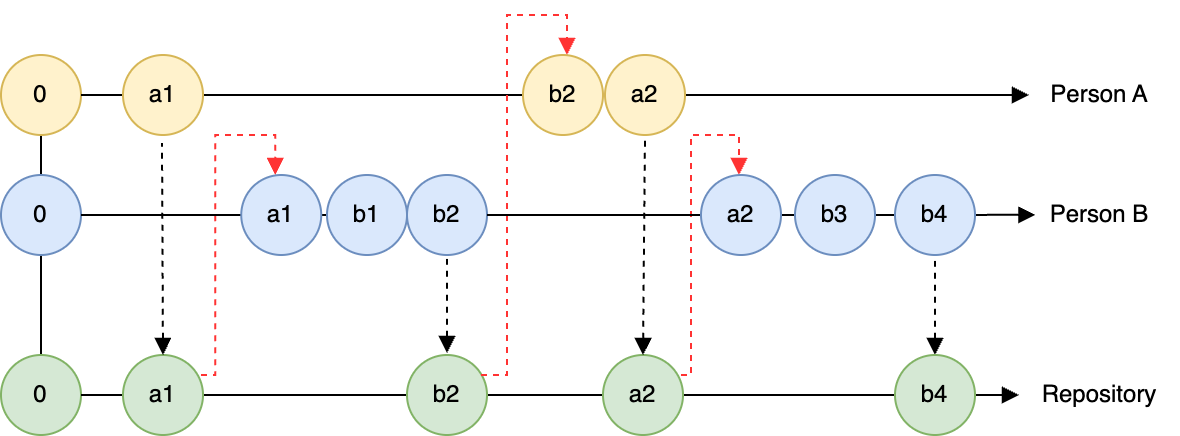
When it is just you, the changes to a repository may seem very unidirectional: you make changes locally and then commit them to the record. Now imagine what Figure 5.1 could look like with several collaborators!
When working with more than one person, the challenge is that multiple people are committing to the same repository. Figure 5.1 also shows that Person B made two changes (b1 and b2)6 Person B is perhaps a little more careful and didn’t commit the changes until b2. If Person A did not incorporate the current state of the repository before making change a2, they would have a merge conflict that needs to be resolved in order to move forward. Merge conflicts can be messy to resolve, and are best avoided. But the following reminders could be helpful:
In a given work session: - Pull the code before you begin to make sure you have the most recent version. - Make edits. - Periodically commit your code locally. - When you are done with a work session, commit all the changes to the version control respository
5.4 Project organization
A second dimension to project management and workflow begins with a good organizational structure to your files and analysis, along with a shared commitment of team members to maintain this file structure. This is an example of defining a compendium (Marwick et al. 2018), which serves two purposes: (1) a structured way to approach a project and analysis, and (2) enables additional reproducibility for your work. A standard data science project may consist of:
- Data. May include raw data or processed data files.
- Analysis. May include scripts to process data, models, or outputs
- Outputs: Derived outputs from analyses and processing input data. Good to separate that these are your work
- Reports: May include manuscripts, vignettes (short descriptions of code), or other documentation needed to understand the code.
- README: An introductory file / landing page where someone would look first.
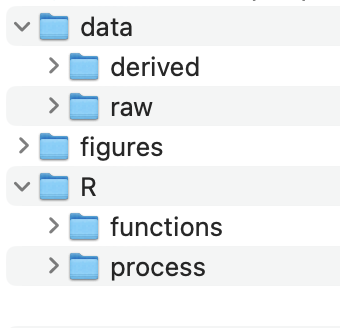
How you choose to name your folders (data or raw-data) is dependent on you. But they should be organized in such a manner that separates out data, process, and outputs.
The internal structure of folders should also follow a logical order, as suggested in Figure 5.2. We like to number any scripts to be analyzed in the number that the should be evaluated (especially if they are to be evaluated sequentially).
We will have more to say about how to utilize this project structure in Chapter 10.
5.5 Mindsets for version control
5.5.1 Take rage quitting off the table
A workflow persona that we would not recommend (speaking from experience!) is the “burn it all down and have the phoenix rise from the ashes”. This type of rage-quitting is tempting (and cathartic?), but also inefficient. John has been burned more than once on this approach and then regretted losing some key parts of the code.
At a minimum, aim to have separate sub folders for data, processing files, and outputs (such as figures or text). This parceling off then allows you to quickly take stock of different pieces of a project.
In the end, we recommend that you start small and make a small tweak, aiming for iterative improvement in project management (Hampton et al. 2015). I have found that the reticence to try new workflow processes is inertia - if something worked before in the past, why not now? Practice makes progress.
5.5.2 Use a growth mindset
It is possible to set up your data science workflows for success. One key piece of advice is not trying to do everything all at once. Don’t commit to a drastic change in your practice (e.g. git - github) - while also trying to enforce a strict structure of coding or project structure that feels unfamiliar.
Making small increments to your work, reviewing projects that you think are successful, or mirror possible styles that you would want to emulate in your own work. Consult best practices for “in the trenches” advice to help you get unstuck (Zandonella Callegher and Massidda 2022; Bryan and Hester 2024). And by all means, give yourself the grace to make a mistake and to keep moving on.
5.6 Exercises
Explore the differences between git and Subversion. Which seems most appropriate for your lab (supervisor)?
Tell us about a time with a workflow fail. More importantly, what did you learn from it?
Watch the entire video of Hadley Wickham coding. Even if you don’t know the R software langue, you can view this as a case study in coding. After viewing it, reflect on the following questions:
- What did you find interesting about the video and the process? Anything surprise you?
- In the video Hadley made mistakes while coding. How did he deal with his mistakes?
- What are your fears about learning a new software such as R / RStudio? What are your hopes?
- How can you take what you learned in the video as you approach learning a new coding or data science workflows?
Some people say that fear of making mistakes can paralyze us (see this blog entry for a humorous - with strong language - with analogies to improv theater). Everyone will make a mistake at some point for a data science project. What strategies will you employ to avoid being “paralyzed” by your mistakes?
We are guilty of this many times over!↩︎
I remember this being magical when it first rolled out. The struggle is real with a word processing program crashing and not having saved recent changes.↩︎
This is especially true as deadlines approach!↩︎
Looking back, perhaps that was too many firsts. Ah, youth.↩︎
I’ll fess up. You can replace “we” with “I” in what follows.↩︎
Perhaps Person B is an ε↩︎