18 From the code workshop to the world
Computer code is instructions written in a specific language for a computer to evaluate. Writing effective code requires a combination of practice, understanding of the nuance of a particular coding language, and a commitment to continuous improvement using a growth mindset.
Let’s be real - no one writes perfect code the first time through. It takes practice and productive progress. This chapter focuses on the mechanics and various stages of coding. Much like programming means a commitment to continuous improvement, so does coding and writing effective documentation. Let’s begin.
18.1 Code development workflow
The code development process and processes for code documentation go hand in hand. Coding can be a way of translating thoughts and ideas in your brain into a computer. Because we can only hold so many things at once, we often leave notes, comments, and “don’t forgets” in our code that help us think through an idea. At this stage, your code perhaps is considered spaghetti code. While spaghetti code is a pejorative term for unstructured code, this is a good place to begin a project, much like a first draft of a paper or a manuscript that you are drafting.
We view the different stages of code development workflow through four different phases, which typically result in a cycle in Figure 18.1:
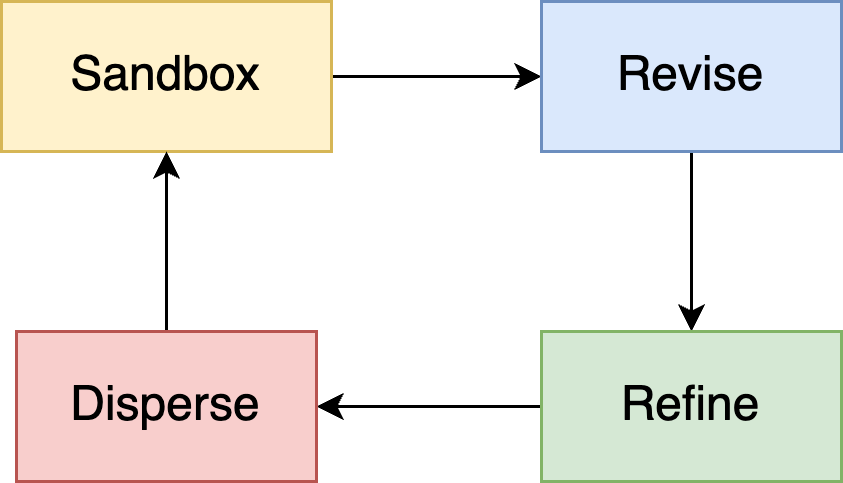
Let’s walk through the different stages of the code development to understand the different steps and practices you need to do.
18.1.1 Sandbox
At this stage, your spaghetti code is a sandbox of possibilities you will eventually explore. The primary goal is to get ideas down on paper. Perhaps at this stage you are figuring out the best ways to read in data (Chapter 6) or some exploratory data visualization (Chapter 15). Mainly you are working out the contours of how you plan to accomplish a specific objective.
Documentation in this stage reflects the sandbox nature of your project. Documentation is usually left as comments in the text, perhaps with specific reminders of what you are trying to accomplish, web links to helpful websites, or different explanations and aspirations of what a function or code structure accomplishes. In the Sandbox stage, you are the audience. See Figure 18.2 for an example of a code sandbox we worked on to analyze outputs of an R package we developed to compute soil carbon fluxes (Zobitz et al., n.d.). Usually the first bit of code contains information for what this particular code wants to accomplish, along with a to-do list of helpful things that the code accomplishes.
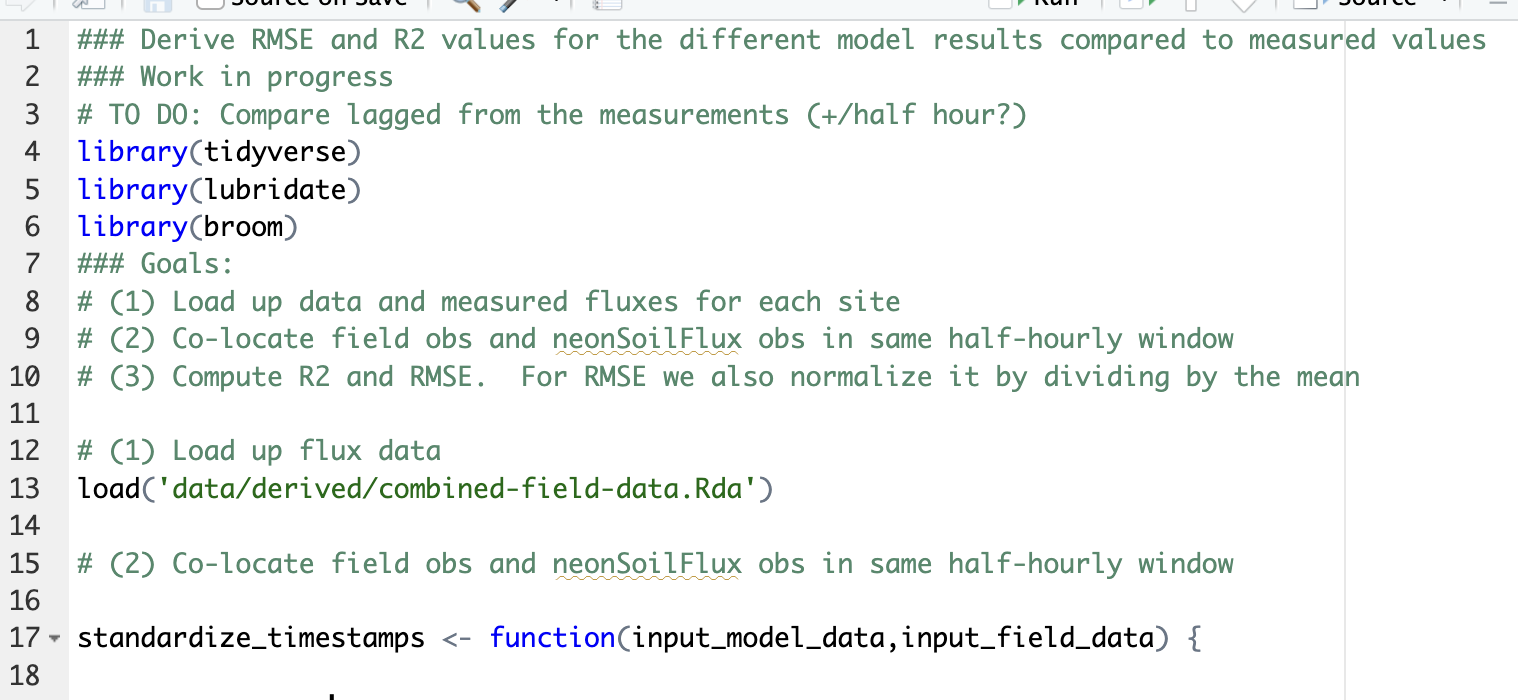
Don’t be afraid to include comments and notes to make your code more human. We posit that writing code is a creative act; you have your own unique style and voice in writing code. Mainly through comments, our code sometimes is littered with notes to ourselves, words of encouragement, frustration, anger, and most importantly excitement when we get those little “a-ha” moments. There can be a story embedded within code, providing a real human touch to our efforts.1
Wilson et al. (2014) urges that documentation should focus on documenting design and purpose, not mechanics. For the languages you are working with, comments do not slow down your code! To be fair, we have never written code that is over-commented.
In the sandbox stage, use comments to document to organize your thoughts and priorities as you develop code.
18.1.2 Editing
At some point in the code you will have landed on a series of analyses that do what you want to do. You might have lines of code that are loosely connected, but perhaps need to be more readable in terms of what they do. At this point you are ready to transition from the Sandbox stage to the Editing stage. In the Editing stage, future you is the audience.
The editing stage is an appropriate time to remove any extraneous code that doesn’t lead to the specific objective that you are working to accomplish. (Do not simply comment it out!) Your goal in this stage is to create code that if you had to leave it for a length of time, you could come back to it and then quickly pick up where you had left off.
If you feel like you can’t part with code, create a separate file (“code graveyard”) so you don’t clutter your main file.
After pruning the code, then also make sure to follow any code styling conventions such as those listed in the tidyverse style guide or the Python style guide. Several built-in tools (such as styler for R or even AI) that can help quickly transform code to a consistent style with a minimal amount of effort. Some common style guidelines include using:
- a common convention to define variables (
snake_caseorcamelCase) to define all variables - descriptively naming variables (
yoopis not good,avg_rainfallis better). - indentation of code, especially with iterative loops
If you are happy with the version of code you have, then it is useful (especially for scripted files) to include some explanatory information at the top of the code, in comments. One helpful structure is to:
- Include the author of the code.
- When the code was last modified.
- Provde a brief description what the code does.
Any libraries needed for the code should be included up at the beginning - especially when a user may need to download and install the libraries, this helps identify them rather than what they could be on the fly.
At this point, the code has some minimal documentation, underscores the different purposes of the code, and perhaps be handed off to another person with some effort on their behalf to reproduce the analysis. This is a good enough baseline state of code, but the next stage helps you take it to the next level. Most importantly the code will very quickly help you get up to speed if you have to stop working on this project and return to it later.
18.1.3 Refine
Perhaps after the first two stages, your code is at an “in-between” place. Your code is expanding beyond the use of a single script file, and perhaps contains a set of interconnected script files. At this point you may be thinking of functional programming (Chapter 9 or Chapter 10) to aid you. The mantra developed in Chapter 14 (do once → do twice → do many times) also applies to functional programming.
If you feel find yourself copying and pasting the same code, but modifying it somewhat, then think about functional programming to simplify your workflows.
Functions should make your life easier - and they are a good way to standardize what you are doing, avoiding messy and embarrassing errors. Also, functions allow you to develop general purpose documentation - and explanation - rather than just copying and pasting the same code repeatedly. Plus the cognitive load on the user reviewing your code is a lot easier - they can unpack a function and then see the different use cases where it is applied.
Additionally with scripted functions, it is helpful to include additional use case scenarios and to build out more complete documentation. One area that helps build consistent documentation is doxygen, which is an automated code documentation that allows for documentation to be written across several different output formats (i.e. markdown, html, pdf, etc).
18.1.4 Disperse
Congratulations! Your code is developed, plays well with other functions, and perhaps is part of a large collection of related files. You are ready to share your code with the world. This final stage prepares documentation for anyone. What follows is a preview of content we will go into greater depth in Chapters 19 - 21.
When dispersing your code, imagine an audience of novice users. A good organizing question is: What would a new user need to very quickly get up to speed with your project and out of the sandbox?
Some of the options you have at this stage are writing a README file, which is a simple markdown or text file that provides more in depth information about the project, authors, codes of conduct, citation, and other information that is best served there and not embedded within script files. Analogous to a book, the README file could be considered the preface.
If you would like to go deeper in depth than a README file, another possibility is to intersperse short examples that showcase your code - which doesn’t rise to the level of a paper, but at the same point, do provide some additional textual instruction beyond just a few simple lines of explanation. In fact, if in your scripted files you find yourself writing many lines of commented code to describe something, then it is time to write a vignette.
A good vignette should very quickly introduce an idea or concept to a reader, provide some use examples, and then also point to future work to include. A vignette is in the “in-between” stages of not quite a paper, but something more.
The final aspect is a formal data report or manuscript. These may have a well-defined structure (Introduction, Results, Method, and Discussion), and which the final product may be submitted for peer review. Many data science projects for academic journals follow this pathway.
18.2 Good enough can be the new perfect
While it is easy to aim for the “best” practices of scientific computing we recognize that aiming for small, incremental improvements in your coding and documentation practice can help move you forward. Incorporating “good enough” practices can help save you time and be more efficient with your own work. (Wilson et al. 2017).
Table 18.1 lists different components of “good enough” coding practices described in , along with references to this text where we outline them.
| Practice | Big idea | Chapter references |
|---|---|---|
| Data management | Data input and processing | Chapter 2; Chapter 6, Chapter 7, Chapter 8 |
| Software | Analysis and processing using scripts | Chapter 3; Chapter 10, Chapter 14, Chapter 17 |
| Collaboration | Sharing your work in a team environment | Chapter 5 |
| Project organization | Effective management of project components | Chapter 5; Chapter 10; Chapter 17; Chapter 18 |
| Keeping track of changes | Establishing a record of work and changes. | Chapter 5; Chapter 18 |
| Manuscripts | Sharing your work all the way to the final product | Chapter 19; Chapter 20; Chapter 21; |
18.3 Exercises
Review the style guides for different coding languages and companies:
- Google R Style guide
- Google Python Style guide
- Julia Style guide
- tidyverse style guide
- Python style guide
What are some points in common in the different style guides? What is most suprising to you? What small changes would you be willing to commit to?
Box 1 of Wilson et al. (2017) list several key action items and practices to commit to for “good enough” coding practices. Review each of these items and reflect on your use and aspirations for good enough coding practices.
Generative artificial intelligence tools can create code based on natural language prompts, but we find it does miss some of the flair the we add in our comments.↩︎