curl -X GET "https://api.purpleair.com/v1/sensors/253489/history?fields=pm2.5_atm_a" \
-H "X-API-Key: ********-****-****-****-************" \
> sensor_253489_data.txt7 Gathering structured data from the across the internet
This chapter explores strategies for accessing data through application programming interfaces (API) and web scraping. through simple translatable case studies for each. For each of these we will also discuss polite ways to access data that does not gum up the system for others.
7.1 What are APIs and why bother?
Many open data repositories on the Internet make their data available programmatically to users through interfaces called Application Programming Interfaces, or APIs for short. At their most general, APIs are ways for computer programs to communicate with one another across the internet. The general idea is shown in Figure 7.1. You make a request to a remote server, which then retrieves the data onto your computer.
The benefit of an API is to provide a structured way for a user to request (or upload) a specific set of data from (or to) a server. This API-based approach is in contrast with the alternative approach of a person clicking a link to download a file (such a csv) from a data provider’s site, and then loading that data into a programming environment for further processing.
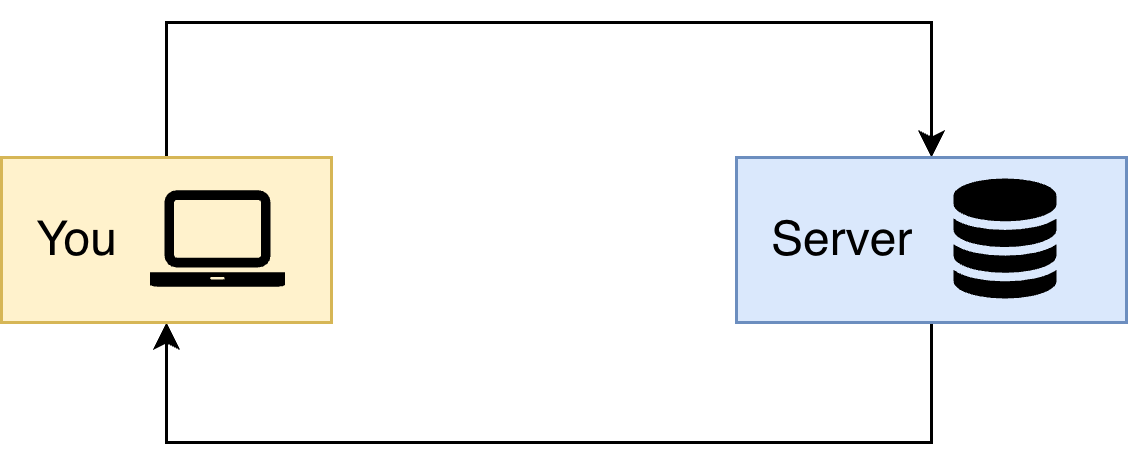
One helpful analogy is placing an order at a restaurant. Perhaps there is a dish on the menu that you are interested in ordering, but it contains an ingredient you may have a sensitivity to or just don’t prefer. For example, John doesn’t like mushrooms or olives, which makes it challenging when sharing a pizza with him. However by making a request to the server (in John’s case, it could be a pizza that has no mushrooms or olives on half of it), the pizza is prepared to your taste and the served the way you want it. Using an API is like the request to for a pizza with no mushrooms or olives on half of it. Downloading a file and then processing it is similar to ordering a pizza, and then John has to pick off the olives and mushrooms on each slice that he eats.
Another benefit is that with an API, the user can request precisely what they want directly and have it brought into the programming environment without the intermediate step of a manual download. This not only saves time, but is a big factor in making the entire data workflow reproducible. Before we dive in to an example using APIs, there are few additional terms that need to be defined which determine how the dataset is accessed:
- REpresentational State Transfer (REST) is an architecture for structuring the way that distributed hypermedia systems communicate with one another (Fielding and Taylor 2002). In the case of web based data queries, API’s may be described as being RESTful, which means that they adhere to the principles of this architectural approach.
- JavaScript Object Notation (JSON) is a hierarchical, structured plain text format that many remote servers use to provide data requested via an API call. It is similar in many ways to other markup languages like Extensible Markup Language, or XML.. With JSON, different segments of the data can be defined arbitrarily, which is flexible enough to work with many many different types of structured data. JSON schema defines how the downloaded files are structured. Providers that make their schema available are incredible helpful.1
- API keys may be required in part of the query sent to a remote server. For many providers, you can sign up for these on their web portals, and they both allow you to identify yourself to the remote server and also track usage by different users overtime. For many open data sources this is an important part of their ability to report use of their resources to funding agencies or infrastructure providers. Sometimes API keys are not required to access data, and some sites only require API keys for heavier users of their data.
TipCheck to see if external wrapper packages exist
If you would like to access a large or popular repository, there is likely to be a “wrapper” package for R and/or python to access it without having to handle the raw JSON yourself. One example of the tidycensus R package, which does the heavy lifting of importing in United States Census data into R.2
With JSON, there are many packages available for common scripting languages to parse a JSON file - see the JSON page for all the options! Using these packages is a huge time saver.
7.2 Case studies with APIs and friends
7.2.1 Investigating air quality with PurpleAir sensors
Let’s take a look at a case study with a simple query to an API. In recent years, Minneapolis, Minnesota, routinely comes under air quality alerts due to the presence of smoke from Canadian wildfires.. These alerts impact the entire population (not just those who are sensitive). The Minnesota Pollution Control Agency issues a color-coded forecast ranging from green (good) to maroon (unhealthy for all). These alerts are a local connection to changes in Canadian wildfire intensity due to climate change. Understanding this connection lies with a shared transnational commitment to mitigating climate change effects. The increased wildfire smoke is not just with the responsibility of one country, despite what some United States Congressional members believe.
PurpleAir sensors are a type of air quality monitoring devices that can be used to effectively crowd source, high resolution, air quality data in places where it may not be provided by state federal or other government agencies. In many cities, there may be one or just a few government air quality sensors with publicly available data, but the PurpleAir network may have hundreds or even thousands of sensors deployed across the city. While these sensors may not produce data of the same quality as a carefully calibrated top-end instrument, often the higher spatial and temporal resolution of these data can make up for those deficiencies.3
Individual users buy PurpleAir sensors which are network connected, and can opt into allowing their data to be displayed on public dashboards. In return, PurpleAir also makes their data available via API. To access their API you need to create a free account, and it is helpful to use their public map to identify the sensor index.
For this example we are going to access the 10 minute average of PM2.5 for sensor 253489, which is part of the city of Minneapolis’ community air quality monitoring project. We will use the terminal to send an API call to their server and then write it out to a file called sensor_253489.txt for further analysis:
Let’s break this API call down step by step.
- The command
curlis the command-line (terminal) tool to send the request to the API. - The next bit
-X GETspecifies the method that we are using to access the server. When you are accessing an API you usually willGETdata (have read acces only). - The
https://api.purpleair.comspecifies the server /v1/sensors/253489/historytells you the specific endpoint you want to use, specifying both the sensor and the historical data.?fields=pm2.5_atm_ais the query parameter. PurpleAir provides other additional data. specifies- The backslash
\is a line continuation character that allows you to split a long command across multiple lines for readability. - The next line
-H "X-API-Key: ..."adds the HTTP header with the required API key. This is a line continuation character in the shell. While we used********- ...you will replace it with your specific API key. - Finally
> sensor_253489_data.txtis the output redirection to the file, rather than just to the terminal.
In full disclosure, we developed this API query by using from sample queries by reviewing the API documentation. This API page was extremely helpful in designing successful queries directly from the website before trying it on our local computers. A screenshot of the file sensor_253489.txt is shown in Figure 7.2. The API returns the data in the JSON format.
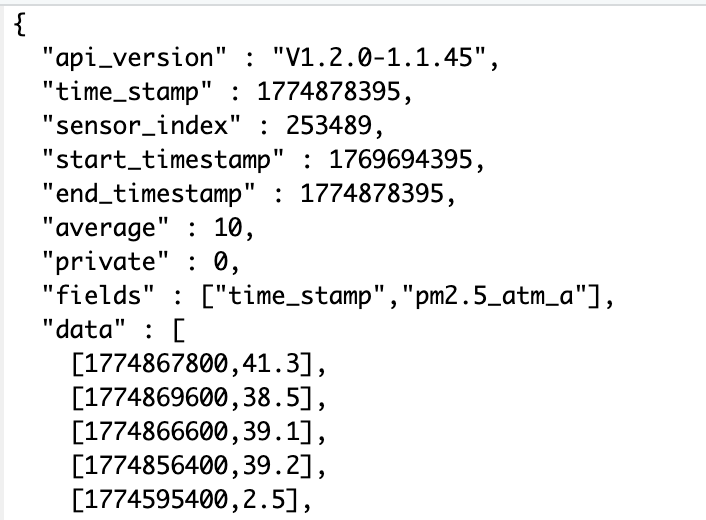
data. The first number (time_stamp) is reported in UNIX time, and the second number the reported value.
The API returns a the history the measurement, which the first data observation is reported as [1774867800,41.3], where the time stamp 1774867800 is reported in the Unix UTC timestep, whic represents the seconds since 1 January 1970. This is a common timestamp that can be converted using packages such as lubridate (R), pandas (Python) or Dates (Julia).
7.2.2 API alternatives
APIs are the preferred method for accessing online data, since they are well-structured and the data they return can often be relatively easily parsed by your programming language of choice. However, in some situations there is no API available, and you may need to resort to using a technique called ‘web scraping’ to get the data. The idea here is that you are directly downloading the contents of the page (often the raw html) and then parsing this to extract the data you are interested in. This is a significantly more involved and complicated operation in many cases because web pages can change at any time, and to get exactly the data you want in a useable format, you may need to write some rather specific parsing code using either a specialized package like beautifulsoup (python) or rvest (R).
The Keeling Curve is a now famous record of carbon dioxide concentration at an observatory in Mauna Loa, Hawai’i first published in 1958 (Keeling 1958). According to Google Scholar it has over 1400 citations.4
Let’s say you wanted to study the most recent papers that cite Keeling (1958). Rather than clicking on each link, you want to extract the link into a data table for future reference.
We will use R and the package rvest to extract the information. First we will read in the raw html of this page into R:
library(rvest)  # Package for web scraping
library(dplyr)  # For using the pipe operator

# Define the webpage
url <- "https://scholar.google.com/citations?view_op=view_citation&hl=en&citation_for_view=08se0NAAAAAJ:u5HHmVD_uO8C"

# Read the page in
page <- read_html(url)

# Get out the information for citations.
page_info <- page |>
  html_nodes(".gs_rt")
The function read_html returns the raw html, which needs to be processed. The webpage is structured into different elements using cascading style sheets (CSS). Unpacking CSS is a little out of field for this text, but what you need to know is that CSS define common functions that ensure a webpage maintains a uniform look and style. In our case we wouldn’t want the design of the page to look differently if we wanted to investigate a different article. Here, the node .gs_rt provides the information needed to extract out the current citations of this article. Don’t worry if you didn’t recognize the node name - we didn’t either! We used the handy Chrome extension SelectorGadget which allowed us to identify the particular element by inspection of the webpage.
The next bit is to extract the weblinks. In html, weblinks are determined with <a> href = www.linkgoeshere.com <\a>. Since that is a systematic expression, accessed through html_node and its attributes:
page_info |>
html_node("a") |>          # look for the <a> tag inside each title node
  html_attr("href")
[1] "/scholar?cluster=17844104962107051345&hl=en&scisbd=1&oe=ASCII&as_sdt=5,24&sciodt=0,24"
[2] "https://www.sciencedirect.com/science/article/pii/S0032579126004931"
[3] "https://open.library.ubc.ca/soa/cIRcle/collections/ubctheses/24/items/1.0451702"
[4] "https://www.mdpi.com/2076-3298/13/3/145"
[5] "https://dergipark.org.tr/en/pub/bajece/article/1888550"
[6] "https://link.springer.com/article/10.1007/s41748-026-01029-2"
[7] "https://pubs.acs.org/doi/abs/10.1021/acs.analchem.5c05937"
[8] "https://www.sciencedirect.com/science/article/pii/S0883292726000272"
[9] "https://pubs.acs.org/doi/abs/10.1021/acs.est.5c08595"
[10] "https://link.springer.com/article/10.1007/s40641-025-00208-z"
[11] "https://aslopubs.onlinelibrary.wiley.com/doi/abs/10.1002/lol2.70095" Voila! Now you can start to investigate each article. While this is a simple example to illustrate what is possible, but in general, it’s always going to be easier and more straightforward if the data you want to use can be accessed via an API.
7.3 Strings and regex
Often times the textual data that is returned from remote servers is in the form of some sort of structured markup text, as we saw in Figure 7.2. Unless you have wrapper packages available, what may get returned form your API call is plain text format, or a string.. Handling textual or string data requires using regular expressions, or regex..
We get it, regular expressions can be horribly opaque to understand. (The so-called prize for the “worst” regular expression goes to an email validator. Fortunately, regular expressions are structured similarly across whatever programming language you use. We argue that a little investment to understand how to set one up is worth the additional effort, making you a more efficient programmer. To get started, here are some helpful resources:
- R for Data Science has chapters on strings and regular expressions (Wickham and Grolemund 2017). The stringr package is super useful for processing strings in a tidy format.
- Modern Data Science with R contains useful cases studies about extracting quantitative information from textual data (Baumer et al. 2021).
7.4 Advice for politely using APIs
Many extremely valuable data repositories online are made freely available for anyone to use. These resources are key to many environmental data scientists workflows and analyses. It is important that we as a community respect the maintainers of these resources and the need to have them available to the community more broadly. The way to do this is to be polite in your usage of API and downloaded resources. Here are some suggestions in how to do that:
Consider the size of your API request. It may be tempting to download all of the data available from a server on a particular organism or area of interest, it is important to remember that this could place a very heavy burden on the server to bring those files to your local computer. This is analogous to “hacking the menu” at the restaurant, which could slow down the kitchen staff.
A better practice is to make your queries as focused as possible, and only retrieve the data that is necessary for your particular analysis. Often, it may be useful to download a small example portion of the data and take a look at it directly before writing, a larger query, a larger or more complex query to get the full set of data you hope to eventually work with.
Avoid downloading large files. Related to the previous point, downloading an enormous single file or trench of data to your computer at once can be very taxing on both the server, as well as on your network connection.
A better practice is to query, and then save, numerous small files. This makes it easier for the server to handle many requests at the same time. This approach is also conceptually useful because it requires you to think carefully about what data you need to answer your questions before expanding the computational and network resources to download them all from the remote resource.
Space out the size of your requests. Making a huge number of requests one after the other (through the use of a for loop, for example) can overload and crash the server. Sometimes APIs will limit this practice and lead to a Distributed Denial of Servide (DDoS) warning.. This practice is similar to constantly calling your server over for free refills or breadsticks multiple times throughout a meal.
If you must use a for loop, a better practice is to code a “pause” of a few seconds after each iteration of a loop that is used to retrieve data from a provider via an API. Different programming languages have different syntax to code this pause.
Consider storing the dataset locally. Depending on whether or not you are manually passing the data that is downloaded or using a package to do so may influence whether or not the data are archived locally on your machine or instead are downloaded and read directly into your programming environment in memory. If the data are read directly into memory, then you may want to make sure that you add a line in your script to save those files toYour local computer so that you do not need to re-download them every time you run your script. For larger or more complex queries it may make sense to set up a small local database to store these local data in order to speed up future analysis and reduce the burden on the remote server.
7.5 Exercises
Determine how to code a pause in an API call in your favorite coding language.
Challenge yourself with crossword regular expressions.
Use the PurpleAir API to download air quality data (10 minute average PM2.5) from a sensor from where you live. Parse the data to make a timeseries plot of the acquired data.
The global biodiversity information facility (GBIF) is a widely used resource on species occurrence data from around the world. These data are made available through a comprehensive API. Explore this database to design a query, evaluating the result in your favorite programming language.
Scrape the citation information for one of your favorite articles (or your advisor) using the methods described in this section.
Not all providers will make a schema available, and sometimes you do need to hunt around in the data yourself.↩︎
A free API key is still required.↩︎
We have found this true for many other community science initiatives, such as the USA National Phenology network.↩︎
This is probably an underestimate, conditional on the time since Google Scholar keeps records. See Marx et al. (2017) for a more detailed study.↩︎