21 Writing up your work the open way
Congratulations - you are ready to communicate your work with the world! It is time to “write it up”. Dissemination of work - namely publication in peer-reviewed journals - is an expectation for many scientific positions. Writing could include project summaries or reports of work in progress. No matter if you are a field ecologist, lab experimenter, or coder, writing is often times viewed as something that you “need” to do rather than something you “want” to do. This chapter is written for those of us who consider writing as something that “needs” to be done (and we do include us!). This chapter relates some hard-learned lessons (and tips to avoid) when writing up an environmental data science project. Let’s begin.
21.1 Activation energy: writing as a habit of mind
Let’s face it - writing can be hard. Both John and Naupaka enjoy the discovery phase of data analysis - we can be easily “in the zone” exploring a new dataset using the techniques developed in Chapter 13 for example or creating new visualizations as explained in Chapter 15. Writing up work seems like an unnecessary impediment for forward momentum. Here are three tips we have found that increase our productivity.
21.1.1 Microburst your energy
One of John’s (many!) struggles is the dreaded blank writing screen. Oftentimes I would make elaborate excuses for why I couldn’t write. I thought I needed long periods of blocked off time where I didn’t have anything to work on except writing.
My mindset shifted when I read the book Write It Up by Paul J. Silvia (Silvia 2014). This brief primer reframed that “fingers on the keyboard” is one of the best ways to move forward with writing block, and setting short microbursts of time focusing on writing (and not self-editing) will increase productivity (Peterson et al. 2018). That tip allowed me the grace to just write and not worry about writing.
21.1.2 Write now, edit later
A second tip, also suggested in Peterson et al. (2018), is to focus on editing later. Self-editing is the bane of fingers on the keyboard. One technique to avoid self-editing is stream of consciousness writing: to close your eyes as to not look at the keyboard. This technique may facilitate easier viewing of thoughts in your head compared to what it may look like on your screen. What you write will need editing - almost no one can type perfectly, but fingers on the keyboard with closed eyes may help get the creative juices flowing. As an alternative, speech to text tools may also be another approach if you it easier to talk through your ideas. The importance at this stage is to get ideas down on paper or screen.
21.1.3 Outline with writing templates
The standard scientific paper follows a simple format: Introduction, Methods, Results, Analysis and Discussion (IMRAD). Each section has a clearly defined purpose, so another helpful approach to writing is adhering to outlines and writing templates (Schimel 2011). As discussed in Schimel (2011), knowing the purpose and function of each section is key to developing a concise and impactful writing style, as well as the application of “rhetorical templates” for the trickier introduction and discussion sections. When I get stuck, I have it helpful to review some of these templates, create a brief outline, and then start writing.
The three mindset techniques described above (microbursting, write and edit, and outlining) are a suite of possible strategies to build a more productive (and healthy) writing life. While binge writing could be considered our white whale, implementing different aspects of these approaches is a mindset shift that allowed us to see writing as a continuous process, and not something to be delayed towards the end of a project.
21.2 Blending writing with programming
Writing science broadly requires balancing between many different types of tools: a word processing program, citation management software, pencil and paper (lab notebooks), Excel spreadsheets programs, or statistical software programming. While traditionally the finished product goes written up in a word processing program, we typically need to multitask between multiple programs when writing and refining text. This multitasking poses a barrier and requires literal code switching very quickly.
It doesn’t have to be this hard, or at least some of the barriers can be reduced. There is no single way to present text (e.g. html, pdf); each format has its own style or structure. Memorizing all the rules makes it difficult to be a jack of all trades. Let’s talk about some tools that have existed (perhaps quietly) but are now become more prevalent that allow for seamless transition between different formats. Formally this is called markup language - rules that define how text is formatted and presented. Some of the tools available include the following:
- Markdown converts plain text (no fancy formatting) to html (hypertext markup language) or xhtml (extensible hypertext markup language). Be aware that markdown may refer to both a programming language and converter. For example, this book was written in markdown and converted into a pdf or html using pandoc.
- pandoc is a universal document converter between one markup language to another. Like magic, at the command line it can convert an input file (e.g. .docx) to another (e.g. .html) through simple formatted rules. While sometimes pandoc may not convert things 100% accurately (you can’t outsource editing), pandoc removes many barriers with format conversion so that “good enough is good enough” (Sidebotham 2017).
- LaTeX is a markup language for mathematical typesetting and scientific communication. Note: You may also see TeX, which was the precursor to LaTeX and focuses on formatting, but LaTeX encompasses content as well. It is ok if you just call it LaTeX, as the differences between the two are relevant for people who want to design customized layout formats. A disadvantage is that from our experiences, LaTeX has a steeper learning curve for new users than Markdown and it also requires more local installations of software. However online tool such as overleaf, which contains some basic templates to get you started.
- RMarkdown is an implementation of Markdown that allows embedded chunks of R code. In terms of the R ecosystem, this was an add-on package that was also incorporated into RStudio. While understandably not as extensive as pandoc to convert, it provides the authoring of common output formats that people use.
- quarto is the next generation expansion of RMarkdown that incorporates Julia and Python, whereas RMarkdown can only allow R integration. This book was written using quarto.
- Jupyter is integration of Python, Julia, and R in an open format language that allows conversion into many formats. This was the next iteration from iPython, which is analogous to RMarkdown. The neat part about Jupyter is that a variety of code languages (Python, R, and Julia) can be incorporated into the same notebook.
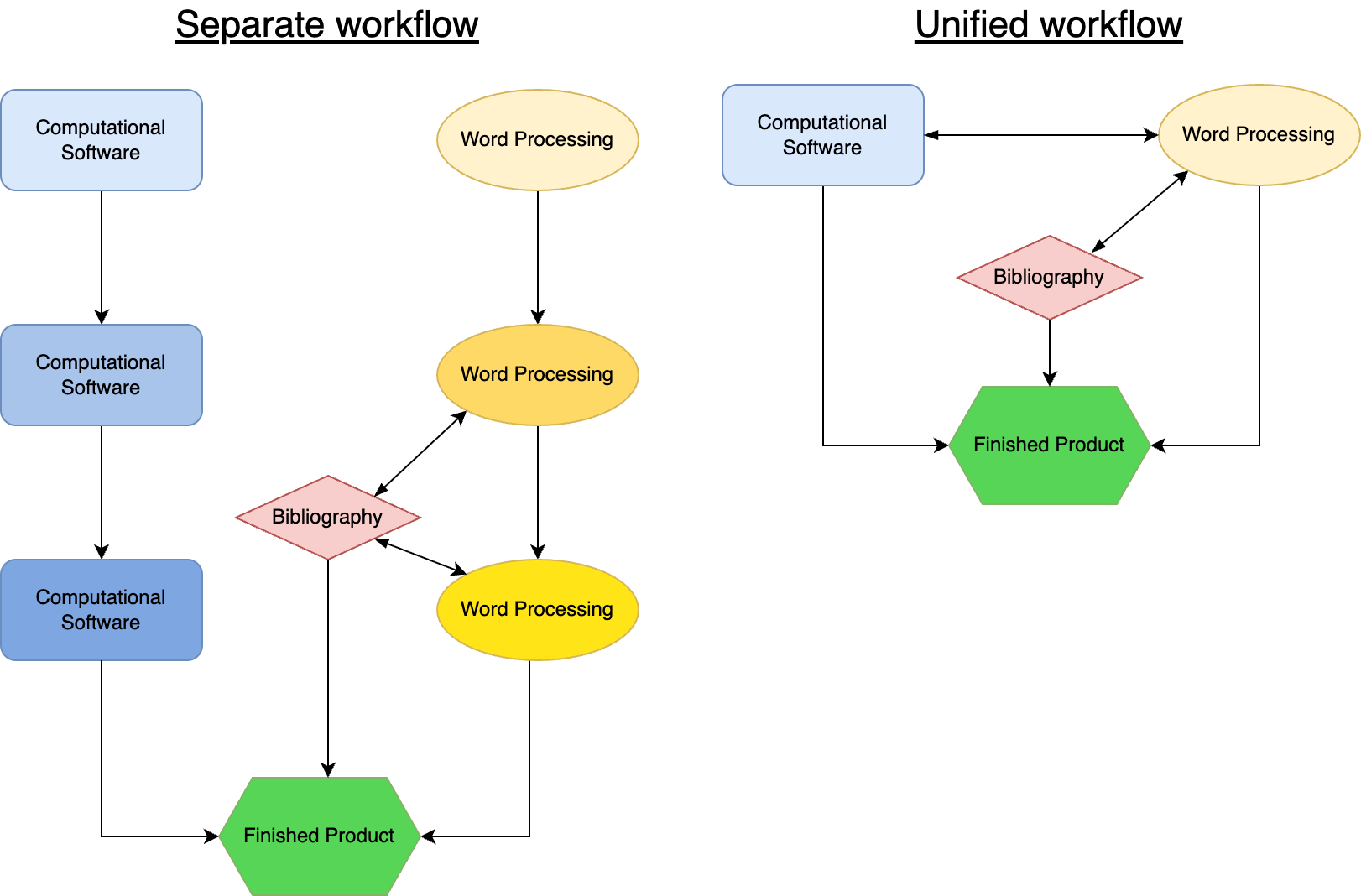
Figure 21.1 shows a conceptual diagram for the separate workflows (i.e. Python/R with LaTeX or google docs or Microsoft Word) compared to a unified workflow (RMarkdown, quarto, or Jupyter notebooks). In the separate workflow, different versions of the code and document in process are indicated with the darkened shading. The code is “walled off” from the word processing, and it is only at the end that the finished product is assembled. The Bibliography (red diamond in Figure 21.1) may be developed as the word processing occurs. On the other hand, the unified workflow allows for an all-in-one experience, with both the writing and computational software influencing each other. The fluidity between the computational software and the writing helps to quickly adapt to any needed changes as the analysis and writing develops.
21.3 Citation management
One area that we are both happy to cede to the technical overloads is citation formatting. Depending on the publication you may be required to cite the bibliography in styles such as Harvard, APA, or as a numbered reference (usually in more mathematical journals). Fortunately there are free online tools such as zotero or endnote in which you can acquire the metadata information for a citation. Depending on how you are preparing article, you can specify the bibliography style at the touch of a button. The focus is making sure that the metadata is correct, and the program will format it according the preferred citation style.
A digital object identifier (doi) is a unique permanent link to a journal or book that provides more permanance to a bibliographic entry. We recommend that it is worth the effort to include a doi for your bibliographic entries. Active doi links also make it easier to verify your entries are correct - which can be a critical final step prior to publication.
While it can be tedious, always allocate time to verify your bibliographic entries are correctly cited. Build this into your workflow prior to publication of an article - mistakes can (and do propagate) through the bibliography! Hat tip to John’s thesis advisor David Bowling for insisting on verification of bibliography entries before publication.
Beyond the citation manager, you may also have the option to export a citation as a biblographic BibTeX (.bib) file. This is common when using LaTeX, but the many of the tools referenced in Section 21.2 can also use BiBTeX files. A .bib file contains the metadata used in citation.
21.4 Submitting work for review
Now that you have written your work, let’s talk about what happens next when you submit it for peer review. Generally speaking, there are three types of review processes:
- Double-blinded: both the reviewer and author do not know their identities. The text that is submitted needs to be scrubbed clean of any self-identifying information.
- Single-blinded: the author does not know who the reviewer is unless they are disclosed. This perhaps is the most traditional type of review.
- Open: both the reviewer and the author know their identities, which may be disclosed during or after publication. A variation on this is when the reviewer comments are open for everyone to see at each stage of the review process (such as done with journals in Copernicus Publications). After the initial manuscript reivew is posted, an open review commences where anyone can post a comment (and also needs a response from the authors).
The different types of reviews are meant to reduce any chance of bias/harm on the part of the reviewer, author, or both (Smith et al. 2023, 2024). Principles of open science may suggest that an open review is preferred, this type of review process may perpetuate bias to marginalized groups (Settles et al. 2024).
21.5 The spectrum of journal access
A deciding factor for publication is the type of access the final manuscript has. Funding requirements may require you to publish open access. More recently many other types of publications models have been adopted:
- Closed access: is the traditional model. Accessing an article requires a subscription to the journal. Typically academic libraries or individual purchased subscriptions would pay for the subscription to a publisher’s journals. Authors would not be assessed an Article Processing Charge (APC) to publish. Closed access used to be the default for much scientific literature.
- Hybrid open access: While access is still through a subscription, an author could pay an article publishing charge (APC) to have their manuscript open to anyone, regardless if they had a subscription or not.
- Green Open Access: in this instance, an author may publish a version of their work through an institutional repository or preprint archives such as arXiv, biorXiv, EarthArXiv (“ArXives of Earth Science” 2018). Preprint services provide an accessible way for the information to be disseminated, but may not be formatted as the final publication in the journal. Sometimes there may be an embargo/delay before the article could be shared.
- Gold Open Access: Articles are immediately accessible, but the author needs to pay an article processing charge. These APCs tend to be the most expensive because the author is essentially funding the journal costs of publication.
- Diamond Open Access: are fully open with no fees for readers OR authors. Typically these journals are less common, and funded by institutions.
Writing your work in the open way contains much nuance in terms of when, how, and where you write your work. Ultimately it is up to you or your team as to the best way to communicate share your work with the world.
21.6 Exercises
Review some journals that you might be interested in publishing in. What are the article publication fees? How would you characterize the access?
Reflect on your writing habits and workflow. Where do you see a need to improve? How much time do you allocate to writing in a given week? What changes woudl you like to make? How do you plan to make them? Come up with a plan for a week to improve the amount of time you spend writing and evaluate it the following week?
How do you do much of your writing? Try out a (new-to-you) technique to blend writing with programming in Section 21.2 and evalute it.